


Introduction
Modern computer networks contain far more devices than ever before.
A typical home may have:
- Smartphones
- Laptops
- Tablets
- Smart TVs
- Gaming Consoles
- Security Cameras
- Smart Home Devices
Businesses often operate hundreds or even thousands of connected devices.
For these devices to communicate on a network, each one requires a unique IP address. If you’re new to networking, start by learning what is an IP address and why every device needs one to communicate on a network.
Imagine manually assigning IP addresses to every device every time it connects to a network.
For a network with hundreds or thousands of devices, this would be time-consuming, inefficient, and prone to errors.
Fortunately, networking engineers solved this problem with a protocol called:
DHCP
DHCP automatically assigns IP addresses and network settings to devices, allowing them to communicate without manual configuration.
Today, DHCP is one of the most important services in networking.
Every time you connect your phone to Wi-Fi, plug a computer into a network, or join an office network, DHCP is likely working behind the scenes.
Most users never see it, yet without DHCP, modern networking would be far more complicated.
In this guide, you’ll learn:
- What DHCP is
- How DHCP works
- The DORA process
- DHCP components
- DHCP leases
- DHCP scopes
- DHCP reservations
- DHCP security
- DHCP troubleshooting
- DHCP and DNS integration
- DHCP and NAT relationships
By the end of this guide, you’ll have a complete understanding of DHCP and why it is essential for modern networking.
What Is DHCP?
DHCP stands for:
Dynamic Host Configuration Protocol
It is a network management protocol that automatically assigns IP addresses and other network configuration settings to devices.
Without DHCP, administrators would need to manually configure:
- IP Address
- Subnet Mask
- Default Gateway
- DNS Servers
for every device connected to the network.
DHCP automates this entire process. To understand exactly what DHCP assigns, read our guide on what is an IP address and how IP addressing works.
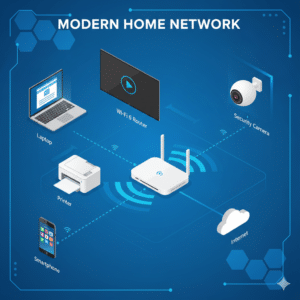
Simple Definition of DHCP
DHCP is a protocol that automatically provides network configuration information to devices when they join a network.
Instead of manually assigning settings, devices request them from a DHCP server.
The DHCP server responds with the necessary information.
DHCP in Simple Terms
Imagine checking into a hotel.
You arrive at reception and request a room.
The hotel receptionist assigns:
- A room number
- Access information
- Temporary permission to use the room
When you leave, the room becomes available for another guest.
DHCP works similarly.
When a device joins a network:
Device
↓
Requests Configuration
↓
DHCP Server
↓
Assigns IP Address
The assigned address can later be reused by another device.
What Information Does DHCP Provide?
DHCP does much more than assign IP addresses.
A DHCP server can provide:
IP Address

Subnet Mask

Default Gateway

DNS Servers

Lease Duration

Time Servers

Network Routes
These settings allow devices to communicate effectively. These DNS servers are responsible for converting website names into IP addresses. Learn more about what is DNS and how it works.
Example DHCP Assignment
Suppose a laptop joins a home Wi-Fi network.
DHCP may assign:
IP Address:
192.168.1.100

Subnet Mask:
255.255.255.0

Gateway:
192.168.1.1

DNS Server:
8.8.8.8
The user does not need to configure anything manually.
Why DHCP Exists
Without DHCP:
Every device would require manual setup.
Example:
Laptop
↓
Manual Configuration

Phone
↓
Manual Configuration

Tablet
↓
Manual Configuration
This would be impractical for modern networks.
DHCP solves this problem by automating configuration.
Real-World DHCP Example
Imagine visiting a coffee shop.
You connect your phone to the Wi-Fi.
Within seconds:
Phone
↓
DHCP Request
↓
DHCP Server
↓
IP Address Assigned
↓
Internet Access
No manual configuration is required.
This process occurs automatically.
Why DHCP Is Important
DHCP has become a foundational networking service.
Without DHCP, managing modern networks would be extremely difficult.
Let’s examine why DHCP is so important.
Automates IP Address Assignment
The primary purpose of DHCP is automation.
Without DHCP:
Administrator
↓
Assigns Every IP Address Manually
With DHCP:
DHCP Server
↓
Automatically Assigns Addresses
This saves enormous amounts of time.
Prevents Configuration Errors
Manual configuration often leads to mistakes.
Examples include:
- Duplicate IP addresses
- Incorrect gateways
- Invalid subnet masks
- Wrong DNS servers
DHCP reduces these errors significantly.
Supports Large Networks
Consider a university network.
Devices may include:
- Student Laptops
- Faculty Computers
- Printers
- Wireless Devices
- Servers
Total devices may exceed:
10,000+
Manual configuration would be nearly impossible.
DHCP enables scalable network management.
Improves User Experience
Users expect devices to work immediately.
When a device joins a network:
Connect
↓
Receive Configuration
↓
Access Network
This seamless experience is made possible by DHCP.
Supports Mobile Devices
Modern users frequently move between networks.
Examples:
Home Wi-Fi

Office Wi-Fi

Hotel Wi-Fi

Airport Wi-Fi

Coffee Shop Wi-Fi
DHCP automatically provides new network settings at each location.
Efficient Address Utilization
Not every device remains connected permanently.
DHCP can reclaim unused addresses and reassign them.
This improves address utilization.
Example:
Device Disconnects
↓
Lease Expires
↓
Address Reused
This is especially important in large environments.
Simplifies Network Administration
Administrators can manage address allocation centrally.
Benefits include:
- Easier deployment
- Better scalability
- Reduced workload
- Improved consistency
DHCP dramatically reduces administrative overhead.
History of DHCP
To fully appreciate DHCP, it’s helpful to understand how networks operated before DHCP existed.
Early Networking Challenges
In the early days of computer networking, devices were configured manually.
Administrators entered:
IP Address

Subnet Mask

Gateway

DNS Server
for every device.
This process became increasingly difficult as networks grew.
Problems With Manual Configuration
Manual addressing created several issues:
- Time-consuming setup
- Human errors
- Duplicate addresses
- Difficult maintenance
As organizations expanded, these problems became more severe.
BOOTP: DHCP’s Predecessor
Before DHCP, networks often used:
BOOTP
which stands for:
Bootstrap Protocol
BOOTP allowed devices to obtain limited network configuration automatically.
However, it had significant limitations.
Limitations of BOOTP
BOOTP required administrators to create static mappings.
Example:
Device MAC Address
↓
Specific IP Address
This reduced flexibility.
BOOTP could not dynamically allocate addresses efficiently.
Creation of DHCP
To solve BOOTP’s limitations, DHCP was developed.
The protocol was standardized in:
1993
through:
RFC 1531
Later improvements refined the protocol further.
Today, DHCP is defined primarily by:
RFC 2131
which remains the foundation of modern DHCP implementations.
Why DHCP Was Revolutionary
DHCP introduced several major improvements:
Dynamic Address Allocation
Addresses could be assigned automatically.
Lease Management
Addresses could be reused.
Centralized Administration
Configuration became easier.
Scalability
Large networks became manageable.
These innovations transformed network administration.
DHCP Adoption
Throughout the 1990s and 2000s:
- Businesses adopted DHCP
- Universities deployed DHCP
- ISPs integrated DHCP
- Home routers added DHCP support
Today, virtually every router includes a built-in DHCP server.
DHCP in Modern Networks
Modern DHCP implementations support:
- IPv4 Networks
- IPv6 Networks
- Cloud Environments
- Enterprise Networks
- Wireless Networks
- Data Centers
Despite being developed decades ago, DHCP remains one of the most important protocols in networking. If you’re unsure about the differences between internet addressing standards, see our detailed comparison of IPv4 vs IPv6.
Every day, billions of devices rely on DHCP to obtain the configuration necessary for internet and network access.
How DHCP Works
DHCP operates using a client-server model.
Whenever a device joins a network, it communicates with a DHCP server to obtain the network settings required for communication.
Instead of requiring users to manually enter configuration information, DHCP automatically provides everything needed.
This process happens within seconds and is completely transparent to most users.
DHCP Client and DHCP Server
Two main components participate in DHCP communication:
DHCP Client

DHCP Server
The DHCP client is the device requesting network configuration.
Examples:
- Laptop
- Smartphone
- Tablet
- Printer
- Smart TV
- IP Camera
The DHCP server is responsible for assigning network settings.
Examples:
- Home Router
- Windows Server
- Linux DHCP Server
- Enterprise Network Appliance
What Happens When a Device Connects?
Imagine a laptop joins a Wi-Fi network.
Initially:
No IP Address
The laptop cannot communicate because it does not yet have valid network settings.
The DHCP process begins automatically.
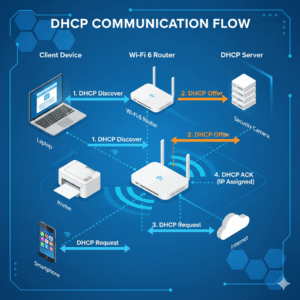
DHCP Communication Overview
The process follows these steps:
Device Connects
↓
DHCP Discover
↓
DHCP Offer
↓
DHCP Request
↓
DHCP Acknowledge
↓
IP Address Assigned
This sequence is called:
DORA
which is one of the most important concepts in DHCP.
DHCP Process Explained
Whenever a device joins a network, it needs several pieces of information.
These include:
IP Address

Subnet Mask

Default Gateway

DNS Servers
Since the device does not yet know where the DHCP server is located, it must discover one.
The DHCP process allows this to happen automatically.
Why DHCP Uses Broadcasts
When a device first connects:
No IP Address
means:
No Knowledge Of Network
The device cannot directly contact a specific server.
Instead, it broadcasts requests to the entire local network.
This allows any available DHCP server to respond.
DHCP Uses UDP
DHCP communication uses:
UDP Port 67
(Server)

UDP Port 68
(Client)
Unlike TCP, UDP is lightweight and efficient.
This makes it ideal for initial network configuration.
DORA Process
The DHCP process consists of four major steps.
Together, these steps form:
DORA
which stands for:
Discover

Offer

Request

Acknowledge
Every DHCP lease assignment follows this sequence.
DORA Overview
Client
↓
Discover

Server
↓
Offer

Client
↓
Request

Server
↓
Acknowledge
Once completed, the device receives network access.
Discover
The first step is:
DHCP Discover
The client announces:
I Need Network Configuration
to the network.
Why Discover Is Needed
At this stage:
Client
=
No IP Address
The device does not know:
- DHCP Server Location
- Gateway
- DNS Server
Therefore, it sends a broadcast request.
DHCP Discover Example
Laptop Connects:
IP Address:
0.0.0.0
Broadcast:
Who Is The DHCP Server?
Every device on the local network receives the message.
Discover Packet Contents
The Discover packet may contain:
MAC Address

Hostname

DHCP Parameters Requested
The MAC address helps identify the device.
Visual Example
Laptop
↓
DHCP Discover
(Broadcast)
↓
Network
The device is searching for available DHCP servers.
Offer
After receiving a Discover message, a DHCP server responds with:
DHCP Offer
The server proposes an available IP address.
What Is Included In An Offer?
The Offer contains:
IP Address

Subnet Mask

Default Gateway

DNS Servers

Lease Duration
These values are suggested, not yet finalized.
DHCP Offer Example
Server Responds:
IP Address:
192.168.1.100

Subnet Mask:
255.255.255.0

Gateway:
192.168.1.1

DNS:
8.8.8.8
The client reviews the offer.
Multiple DHCP Servers
Some networks contain multiple DHCP servers.
Example:
Server A
↓
Offer

Server B
↓
Offer
The client typically selects one offer.
Visual Example
Client
↓
Discover

DHCP Server
↓
Offer
192.168.1.100
The server is effectively saying:
You May Use This Address
Request
The third step is:
DHCP Request
The client informs the server:
I Accept Your Offer
Why Request Is Important
This step confirms which server offer the client intends to use.
In environments with multiple DHCP servers, it prevents confusion.
DHCP Request Example
Client Sends:
I Want
192.168.1.100
and identifies the chosen DHCP server.
What Happens Next?
The selected server reserves the address.
Other DHCP servers withdraw their offers.
This ensures only one address is assigned.
Visual Example
Client
↓
Request
192.168.1.100
The client is formally asking to use the address.
Acknowledge
The final step is:
DHCP Acknowledge
often abbreviated:
DHCP ACK
This confirms the lease assignment.
What Happens During ACK?
The DHCP server sends:
IP Address

Subnet Mask

Gateway

DNS Servers

Lease Duration
The client can now configure its network interface.
DHCP ACK Example
Server Sends:
IP Address:
192.168.1.100

Lease:
24 Hours
The assignment becomes active.
Device Becomes Operational
After receiving ACK:
Client
↓
Configures Interface
↓
Network Access Available
Internet connectivity begins.
Visual DORA Sequence
Client
↓
Discover

Server
↓
Offer

Client
↓
Request

Server
↓
Acknowledge

IP Assigned
This sequence usually completes in less than a second.
Real-World DHCP Example
Let’s see DORA in action.
Suppose a smartphone joins your home Wi-Fi.
Step 1
Phone Connects:
No IP Address
Step 2
Phone Broadcasts:
DHCP Discover
Step 3
Router Responds:
DHCP Offer

192.168.1.150
Step 4
Phone Sends:
DHCP Request

192.168.1.150
Step 5
Router Replies:
DHCP ACK

Lease Approved
Step 6
Phone Receives:
IP Address

Gateway

DNS Server
Step 7
Phone Accesses Internet
Wi-Fi Connected
↓
DHCP Complete
↓
Internet Access
The entire process usually takes only a few hundred milliseconds.
Why DORA Matters
The DORA process provides:
✔ Automatic configuration
✔ Address management
✔ Scalability
✔ Reliability
✔ Efficient IP utilization
Without DORA, network administrators would need to manually configure every device on every network.
This process is one of the reasons modern networking remains manageable despite billions of connected devices worldwide.
DHCP Components
DHCP relies on several important components working together to automatically configure devices.
Without these components, DHCP would not be able to assign IP addresses or deliver network settings.
The primary DHCP components are:
DHCP Server

DHCP Client

DHCP Relay Agent
Each plays a specific role in the DHCP process.
Understanding these components is essential for troubleshooting and network administration.
DHCP Architecture Overview
A typical DHCP environment looks like:
DHCP Client
↓
DHCP Relay Agent
(Optional)
↓
DHCP Server
The client requests configuration.
The server provides configuration.
The relay agent assists communication across networks when necessary.
How DHCP Components Work Together
Example:
Laptop
↓
DHCP Request
↓
DHCP Server
↓
IP Address Assigned
In larger networks:
Laptop
↓
Relay Agent
↓
DHCP Server
↓
IP Address Assigned
This architecture supports both small and enterprise networks.
DHCP Server
The DHCP server is the heart of the DHCP system.
Its primary job is to assign IP addresses and network settings to devices.
Every DHCP environment requires at least one DHCP server.
What Does A DHCP Server Do?
The DHCP server manages:
IP Address Allocation

Lease Management

Configuration Distribution

Address Reclamation
It keeps track of available and assigned addresses.
Information Provided By DHCP Servers
A DHCP server may provide:
IP Address

Subnet Mask

Default Gateway

DNS Servers

Lease Time

Time Servers

Network Routes
All of this information is delivered automatically.
Example DHCP Server Assignment
Server Pool:
192.168.1.100

192.168.1.101

192.168.1.102

192.168.1.103
Client Requests Address:
Laptop
Server Assigns:
192.168.1.100
The address becomes temporarily reserved.
Common DHCP Servers
Examples include:
Home Router
Most home routers contain a built-in DHCP server.
Example:
TP-Link

ASUS

Netgear

Linksys

D-Link
Windows Server DHCP
Many organizations use:
Microsoft DHCP Server
to manage large networks.
Linux DHCP Servers
Popular options include:
ISC DHCP

Kea DHCP

Dnsmasq
These are widely used in enterprise environments.
DHCP Server Database
DHCP servers maintain databases containing:
Active Leases

Available Addresses

Reserved Addresses

Client Information
This database helps prevent duplicate address assignments.
Why DHCP Servers Are Important
Without DHCP servers:
Manual Configuration
Required
for every device.
DHCP servers eliminate this complexity.
DHCP Client
The DHCP client is any device that requests network configuration from a DHCP server.
Clients are the consumers of DHCP services.
What Is A DHCP Client?
A DHCP client is a device that automatically requests:
IP Address

Gateway

DNS Server

Subnet Mask
from a DHCP server.
Examples Of DHCP Clients
Common examples include:
- Laptops
- Desktop Computers
- Smartphones
- Tablets
- Smart TVs
- Printers
- IP Cameras
- Gaming Consoles
- IoT Devices
Virtually every modern network device can function as a DHCP client.
Client Startup Process
When a device powers on:
No IP Address
↓
DHCP Discover
↓
DHCP Process Starts
The client actively searches for a DHCP server.
Example
Smartphone Connects To Wi-Fi:
DHCP Client
↓
Requests Address
Router:
DHCP Server
↓
Assigns Address
Result:
Internet Access
Why DHCP Clients Matter
Without DHCP clients:
No Requests
↓
No Address Assignments
The client initiates the entire DHCP process.
DHCP Relay Agent
In small networks, clients and DHCP servers usually exist on the same subnet.
However, large networks are often divided into multiple subnets.
This creates a problem.
The Broadcast Limitation
DHCP Discover messages use broadcasts.
Broadcast traffic typically does not cross routers.
Example:
Subnet A
↓
Router
↓
Subnet B
The DHCP request may never reach the DHCP server.
What Is A DHCP Relay Agent?
A DHCP Relay Agent forwards DHCP requests between different network segments.
It acts as a messenger.
DHCP Relay Example
Without Relay:
Client
↓
Broadcast
↓
Router
✖ Blocked
With Relay:
Client
↓
Relay Agent
↓
DHCP Server
✔ Success
Real-World Enterprise Example
Suppose an organization has:
Sales Department

Engineering Department

HR Department

Finance Department
Each department uses a different subnet.
Instead of deploying multiple DHCP servers:
One Central DHCP Server
can serve the entire organization through relay agents.
Benefits Of DHCP Relay
Benefits include:
✔ Centralized administration
✔ Reduced infrastructure costs
✔ Easier management
✔ Better scalability
Common Relay Agent Devices
Examples include:
- Routers
- Layer 3 Switches
- Firewalls
Many enterprise devices support DHCP relay functionality.
DHCP Lease Explained
One of DHCP’s most important concepts is the lease.
Addresses are not usually assigned permanently.
Instead, they are leased.
What Is A DHCP Lease?
A DHCP lease is a temporary assignment of an IP address to a device. Before diving deeper into leases, it helps to understand what is an IP address and how devices use addresses to communicate.
Example:
192.168.1.100
Assigned
For 24 Hours
The address belongs to the client only during the lease period.
Why Leases Exist
Leases improve address utilization.
Without leases:
Unused Addresses
Remain Reserved
indefinitely.
With leases:
Unused Addresses
Return To Pool
for reassignment.
Lease Example
Coffee Shop Wi-Fi:
Customer A:
192.168.1.100
Leaves.
Lease Expires.
Customer B Arrives:
192.168.1.100
reused.
This makes DHCP highly efficient.
Lease Duration
Common lease periods include:
1 Hour

8 Hours

24 Hours

7 Days

30 Days
Administrators choose values based on network requirements.
Lease Renewal Process
Before expiration:
Client
↓
Requests Renewal
↓
Server
↓
Extends Lease
Users typically never notice this process.
Lease States
A lease may exist in several states:
Available

Active

Renewing

Expired
DHCP servers track these states continuously.
DHCP Scope Explained
A DHCP scope defines the pool of IP addresses that a DHCP server can assign.
Think of a scope as the inventory of available addresses.
What Is A DHCP Scope?
A scope contains:
Starting Address

Ending Address

Subnet Mask

Lease Duration

Configuration Options
The DHCP server allocates addresses from this range.
Example Scope
Start:
192.168.1.100

End:
192.168.1.200
Available Pool:
101 Addresses
Clients receive addresses from this range.
Scope Allocation Example
First Device:
192.168.1.100
Second Device:
192.168.1.101
Third Device:
192.168.1.102
Assignments continue until the pool is exhausted.
Scope Exclusions
Administrators can exclude specific addresses.
Example:
192.168.1.1

192.168.1.2

192.168.1.3
Reserved for:
- Routers
- Servers
- Printers
These addresses are never assigned dynamically.
Scope Exhaustion
If all addresses are assigned:
No Available Addresses
New devices cannot obtain configuration.
This is called:
Scope Exhaustion
and is a common DHCP problem.
Best Practices For DHCP Scopes
✔ Use appropriate address ranges
✔ Reserve infrastructure addresses
✔ Monitor utilization
✔ Avoid overlapping scopes
✔ Plan for future growth
Why These Components Matter
The DHCP Server, DHCP Client, DHCP Relay Agent, DHCP Leases, and DHCP Scopes form the foundation of every DHCP deployment.
Together they provide:
✔ Automatic configuration
✔ Efficient address management
✔ Scalability
✔ Centralized administration
✔ Reliable network connectivity
Without these components, modern networking would be far more difficult to manage, especially in large organizations with thousands of connected devices.
DHCP Options
DHCP does much more than assign IP addresses.
One of DHCP’s most powerful features is its ability to distribute additional network configuration through DHCP options.
These options allow administrators to centrally manage network settings for thousands of devices.
Instead of manually configuring every client, DHCP automatically delivers the required information.
What Are DHCP Options?
DHCP options are configuration parameters included in DHCP messages.
They provide additional settings beyond:
IP Address

Subnet Mask

Default Gateway
DHCP options allow devices to receive detailed network configuration automatically.
Why DHCP Options Matter
Without DHCP options:
IP Address Assigned
↓
Manual Configuration Required
With DHCP options:
IP Address Assigned
↓
Additional Settings Delivered Automatically
This greatly simplifies administration.
Common DHCP Options
The most frequently used DHCP options include:
| Option | Purpose |
|---|---|
| Option 1 | Subnet Mask |
| Option 3 | Default Gateway |
| Option 6 | DNS Servers |
| Option 15 | Domain Name |
| Option 42 | NTP Servers |
| Option 66 | TFTP Server |
| Option 67 | Boot File Name |
These options help devices function correctly on the network.
Option 1: Subnet Mask
Example:
255.255.255.0
The subnet mask helps devices determine:
Local Network
vs
Remote Network
communication.
Option 3: Default Gateway
Example:
192.168.1.1
The gateway acts as the route to external networks.
Without a valid gateway:
Internet Access
Fails
Option 6: DNS Servers
Example:
8.8.8.8

1.1.1.1
DNS servers translate domain names into IP addresses.
Most networks distribute DNS settings through DHCP.
Option 15: Domain Name
Example:
company.local
This helps devices automatically identify the local domain.
Option 42: Network Time Protocol (NTP)
Example:
time.company.com
Devices synchronize clocks using NTP servers.
Accurate time is essential for:
- Authentication
- Logging
- Security
- Compliance
Enterprise DHCP Options
Organizations often use advanced options to configure:
- IP Phones
- Wireless Access Points
- Thin Clients
- VoIP Systems
- PXE Boot Devices
This enables centralized deployment and management.
DHCP Reservation
Although DHCP dynamically assigns addresses, some devices require consistent IP addresses.
This is where DHCP reservations become useful.
What Is A DHCP Reservation?
A DHCP reservation permanently associates a device with a specific IP address.
Example:
Printer MAC Address
↓
Always Receives
192.168.1.50
The address is still assigned through DHCP.
However, it never changes.
Why Reservations Are Useful
Some devices must always be reachable at the same address.
Examples include:
- Printers
- File Servers
- NAS Devices
- IP Cameras
- VoIP Systems
- Network Appliances
Changing addresses can cause problems.
Reservation Example
Printer:
MAC:
00:11:22:33:44:55
Reserved Address:
192.168.1.50
Whenever the printer requests configuration:
DHCP Server
↓
Always Returns
192.168.1.50
How Reservations Work
The DHCP server stores:
MAC Address
↓
Reserved IP
When the device connects, the server identifies it by its MAC address.
Benefits Of DHCP Reservations
Benefits include:
✔ Consistent addressing
✔ Centralized management
✔ Easier administration
✔ No manual configuration
✔ Reduced errors
Reservation vs Static IP
Many people confuse reservations with static addressing.
However, they are different.
Static IP vs DHCP
One of the most common networking questions is:
Should I Use Static IP Or DHCP?
The answer depends on the device and use case.
What Is A Static IP Address?
A static IP address is manually configured on the device.
Example:
IP:
192.168.1.50

Gateway:
192.168.1.1

DNS:
8.8.8.8
These settings remain unchanged until manually modified.
What Is DHCP Addressing?
DHCP addressing is assigned automatically by a DHCP server.
Example:
DHCP Server
↓
Assigns Address
Automatically
No manual configuration is required.
Static IP Advantages
Benefits include:
✔ Predictable addresses
✔ Ideal for servers
✔ Reliable remote access
✔ Consistent connectivity
Static IP Disadvantages
Drawbacks include:
❌ Manual administration
❌ Higher risk of mistakes
❌ Difficult scaling
❌ Time-consuming management
DHCP Advantages
Benefits include:
✔ Automatic configuration
✔ Easy administration
✔ Better scalability
✔ Reduced errors
✔ Efficient address usage
DHCP Disadvantages
Potential drawbacks:
❌ Dependency on DHCP server
❌ Address changes may occur
❌ Requires lease management
Static IP vs DHCP Comparison
| Feature | Static IP | DHCP |
|---|---|---|
| Manual Configuration | Yes | No |
| Automatic Assignment | No | Yes |
| Easy To Manage | No | Yes |
| Address Changes | Rarely | Possible |
| Best For Servers | Yes | Often |
| Best For Clients | No | Yes |
Recommended Usage
Static IP:
Servers

Routers

Network Appliances

Firewalls
DHCP:
Laptops

Phones

Tablets

Workstations

Guest Devices
Most modern networks use a combination of both.
DHCP and DNS
DHCP and DNS are two of the most important services in networking.
Although they perform different functions, they work closely together.
What DNS Does
DNS stands for:
Domain Name System
Its job is to translate:
Domain Names
↓
IP Addresses
Example:
google.com
↓
142.250.190.14
What DHCP Does
DHCP assigns:
IP Address

Gateway

DNS Server

Network Settings
to devices.
How DHCP And DNS Work Together
When a device joins a network:
Step 1:
DHCP Assigns Configuration
Step 2:
DNS Server Address Provided
Step 3:
Device Uses DNS
To Resolve Websites
Real-World Example
Laptop Connects:
DHCP Assigns:

192.168.1.100

Gateway:
192.168.1.1

DNS:
8.8.8.8
User Opens:
google.com
DNS Resolves:
142.250.190.14
Connection succeeds.
Dynamic DNS Updates
Many enterprise DHCP servers support:
Dynamic DNS
(DDNS)
When DHCP assigns an address:
DHCP
↓
Updates DNS
Automatically
This keeps DNS records current.
Benefits Of DHCP-DNS Integration
Benefits include:
✔ Automatic hostname registration
✔ Simplified administration
✔ Accurate DNS records
✔ Better scalability
✔ Reduced manual work
Enterprise Example
Employee Laptop:
Receives Address
192.168.10.55
DHCP automatically updates DNS:
laptop55.company.local
↓
192.168.10.55
Administrators can locate devices easily.
Why DHCP and DNS Are Essential Together
DHCP provides:
Network Configuration
DNS provides:
Name Resolution
Together they make modern networking simple, scalable, and user-friendly.
Without DHCP and DNS working together, network administration would be significantly more difficult, especially in large organizations with thousands of connected devices.
DHCP and NAT
DHCP and NAT are two of the most important technologies in modern networking.
Although they serve different purposes, they often work together on the same network.
Most home and business networks rely on both DHCP and NAT simultaneously.
Without them, network management and internet connectivity would be far more complicated. To understand how devices access the internet after receiving an IP address, read our guide on what is NAT.
What DHCP Does
DHCP is responsible for:
Assigning IP Addresses

Providing Gateway Information

Providing DNS Servers

Managing Address Leases
DHCP focuses on:
Device Configuration
inside the network.
What NAT Does
NAT is responsible for:
Translating IP Addresses
between private networks and the public internet.
NAT focuses on:
Internet Connectivity
and IPv4 address conservation. NAT became necessary because IPv4 addresses are limited. Learn more about this in our guide comparing IPv4 vs IPv6.
How DHCP and NAT Work Together
Consider a home network.
Step 1:
Laptop Connects To Wi-Fi
Step 2:
DHCP Assigns

192.168.1.100
Step 3:
Laptop Opens Website
Step 4:
NAT Translates

192.168.1.100
↓
203.0.113.50
Step 5:
Internet Communication Begins
DHCP provides the address.
NAT enables internet access.
Real-World Example
Home Router:
Public IP

203.0.113.50
Laptop:
DHCP Assigned

192.168.1.100
Phone:
DHCP Assigned

192.168.1.101
Tablet:
DHCP Assigned

192.168.1.102
NAT allows all devices to share:
203.0.113.50
while DHCP manages internal addressing.
Why DHCP and NAT Are Often Found Together
Most routers include:
DHCP Server

NAT

Firewall

DNS Forwarding
These technologies work together to provide seamless internet access.
DHCP Without NAT
Example:
DHCP
✓

NAT
✖
Devices receive addresses.
However, internet connectivity may not function correctly.
NAT Without DHCP
Example:
NAT
✓

DHCP
✖
Internet access can work.
However, administrators must manually configure every device.
This becomes impractical as networks grow.
Why Understanding DHCP and NAT Matters
Many network issues involve both services.
Examples:
- Internet connectivity problems
- Address assignment issues
- Router misconfiguration
- Home networking troubleshooting
Understanding the relationship between DHCP and NAT is essential for effective troubleshooting.
DHCP and Routers
For most people, the first DHCP server they encounter is inside their router.
Modern routers typically provide several networking services simultaneously.
What Does a Router Do?
A router connects different networks.
Typically:
Home Network
↓
Internet
The router forwards traffic between these networks.
Router Functions
Modern routers often include:
Routing

DHCP

NAT

Firewall

Wi-Fi

DNS Forwarding
This makes routers powerful networking devices.
DHCP Inside Home Routers
When a device joins a home network:
Phone
↓
Router DHCP Server
↓
IP Assigned
The router automatically provides configuration.
Example
Router Address:
192.168.1.1
DHCP Scope:
192.168.1.100
To
192.168.1.200
Laptop Connects:
Assigned:
192.168.1.100
Phone Connects:
Assigned:
192.168.1.101
Everything happens automatically.
Enterprise Routers
Business environments often separate services.
Example:
Router
↓
Traffic Forwarding

Dedicated DHCP Server
↓
Address Assignment
This improves scalability.
Why Routers Commonly Include DHCP
Benefits:
✔ Easy setup
✔ Automatic configuration
✔ Reduced administration
✔ Better user experience
This is why most home users never need to manually assign addresses.
Advantages of DHCP
DHCP became a networking standard because it offers significant benefits.
Let’s explore the most important advantages.
Automatic Configuration
The biggest advantage is automation.
Without DHCP:
Manual Configuration
Required
With DHCP:
Automatic Assignment
This saves time and effort.
Reduces Administrative Work
Network administrators no longer need to configure every device individually.
Instead:
DHCP Server
↓
Handles Assignments
centrally.
Prevents Address Conflicts
Manual configuration can cause:
Duplicate IP Addresses
DHCP prevents this by tracking assigned addresses.
Supports Large Networks
Organizations may manage:
Thousands Of Devices
DHCP scales efficiently.
Efficient Address Utilization
Addresses are leased temporarily.
Unused addresses return to the pool.
Example:
Device Disconnects
↓
Lease Expires
↓
Address Reused
This improves efficiency.
Centralized Management
Administrators can manage:
Addresses

DNS Servers

Gateways

Options
from a single location.
Supports Mobile Devices
Modern users frequently move between networks.
Examples:
- Home
- Office
- Hotel
- Airport
- Coffee Shop
DHCP automatically adjusts configuration.
Better User Experience
Most users simply connect:
Join Network
↓
Get Address
↓
Access Internet
No technical knowledge required.
Simplifies Network Growth
As organizations expand:
New Device
↓
Automatic Configuration
No manual setup is necessary.
Disadvantages of DHCP
Although DHCP offers many benefits, it is not perfect.
Administrators should understand its limitations.
Dependency on DHCP Server
If the DHCP server becomes unavailable:
No New Addresses
Assigned
New devices may lose connectivity.
Single Point of Failure
Without redundancy:
DHCP Server Failure
↓
Network Problems
Large organizations often deploy backup DHCP servers.
Address Changes
DHCP addresses may change over time.
Example:
Today:
192.168.1.100
Tomorrow:
192.168.1.105
This can complicate certain applications.
Security Risks
Attackers can sometimes exploit DHCP.
Examples:
- Rogue DHCP Servers
- DHCP Starvation Attacks
- Address Spoofing
We’ll examine these threats later.
Troubleshooting Complexity
DHCP problems can be difficult to diagnose.
Possible causes include:
- Scope Exhaustion
- Relay Failures
- Lease Issues
- Server Misconfiguration
Unsuitable For Some Devices
Certain devices require permanent addresses.
Examples:
Servers

Firewalls

Network Printers

NAS Devices
These often use:
Static IP Addresses
or DHCP reservations.
Lease Management Overhead
Large networks must manage:
Lease Times

Address Pools

Reservations

Scopes
Improper planning can cause problems.
DHCP Advantages vs Disadvantages
| Advantages | Disadvantages |
|---|---|
| Automatic Configuration | Server Dependency |
| Reduces Administration | Address Changes |
| Prevents Conflicts | Security Risks |
| Efficient Address Usage | Troubleshooting Complexity |
| Supports Large Networks | Requires Management |
| Better User Experience | Not Ideal For Every Device |
Key Takeaways
DHCP works closely with NAT and routers to provide seamless network connectivity.
Together these technologies allow:
✔ Automatic address assignment
✔ Internet access
✔ Efficient network management
✔ Scalable deployments
DHCP’s advantages significantly outweigh its disadvantages, which is why it remains one of the most widely deployed networking protocols in the world.
From home Wi-Fi networks to global enterprise infrastructures, DHCP continues to simplify network administration and improve user experiences every day.
Common DHCP Problems
Although DHCP is highly reliable, problems can occur.
When DHCP fails, devices may lose network connectivity, internet access, or the ability to communicate with other systems.
Understanding common DHCP problems is essential for effective troubleshooting.
No IP Address Assigned
One of the most common DHCP issues occurs when a device fails to obtain an IP address.
Symptoms:
No Internet Access

Limited Connectivity

Network Error Messages
Example:
IP Address:
0.0.0.0
or
169.254.x.x
This often indicates DHCP communication failure.
APIPA Address Assignment
When DHCP fails, Windows devices may automatically assign:
169.254.0.0/16
addresses.
This process is called:
APIPA
(Automatic Private IP Addressing)
Example:
169.254.10.55
An APIPA address usually means:
DHCP Server Unreachable
Scope Exhaustion
A DHCP scope contains a limited number of addresses.
Example:
192.168.1.100
To
192.168.1.150
Available:
51 Addresses
If all addresses are leased:
No Available Addresses
New clients cannot receive configuration.
Duplicate IP Addresses
Duplicate addresses occur when two devices use the same IP address.
Example:
Laptop
192.168.1.100

Printer
192.168.1.100
Result:
Connectivity Problems
Common causes:
- Static IP conflicts
- Rogue DHCP servers
- Misconfigured devices
DHCP Server Failure
If the DHCP server stops functioning:
No New Leases
can be assigned.
Existing devices may continue working temporarily.
However:
Lease Expiration
↓
Connectivity Loss
may eventually occur.
Incorrect DHCP Configuration
Misconfigured settings may cause:
- Wrong gateway
- Invalid subnet mask
- Incorrect DNS servers
- Routing problems
Example:
Gateway:
192.168.2.1

Actual Gateway:
192.168.1.1
Internet access fails.
DHCP Relay Failures
Enterprise environments often use relay agents.
If a relay agent fails:
Client
↓
Cannot Reach
DHCP Server
Address assignment stops.
Lease Renewal Problems
Clients periodically renew leases.
If renewal fails:
Lease Expires
↓
Address Lost
Network access may be interrupted.
How to Troubleshoot DHCP
Troubleshooting DHCP involves identifying where communication is failing.
The goal is to determine whether the issue originates from:
Client

Network

Relay Agent

DHCP Server
Step 1: Check IP Configuration
First verify the assigned address.
Windows:
ipconfig
Linux:
ip addr
Check:
- IP Address
- Gateway
- DNS Servers
Step 2: Look for APIPA Addresses
If you see:
169.254.x.x
DHCP likely failed.
Possible causes:
- Server unavailable
- Network outage
- Wireless issues
Step 3: Verify Physical Connectivity
Check:
✔ Ethernet cables
✔ Switch ports
✔ Wireless connection
✔ Access points
Without connectivity:
DHCP Communication
Cannot Occur
Step 4: Renew DHCP Lease
Windows:
ipconfig /release

ipconfig /renew
Linux:
dhclient -r

dhclient
This forces a new DHCP request.
Step 5: Test DHCP Server Availability
Verify:
DHCP Service Running
Check:
- Service status
- Server logs
- Scope availability
Step 6: Check Scope Utilization
Example:
100 Addresses Available
100 Addresses Used
Result:
Scope Exhaustion
Expand the scope if necessary.
Step 7: Verify DHCP Relay Configuration
Enterprise environments should confirm:
✔ Relay IP addresses
✔ Routing
✔ VLAN configuration
✔ Interface settings
Step 8: Review Logs
DHCP logs often reveal:
- Address conflicts
- Lease failures
- Authentication issues
- Scope exhaustion
Logs are invaluable for troubleshooting.
DHCP Security Risks
Like any network service, DHCP can be targeted by attackers.
Understanding DHCP security risks helps organizations protect their networks.
Why DHCP Is Attractive To Attackers
DHCP controls:
IP Address Assignment

Gateway Assignment

DNS Configuration
Compromising DHCP can affect an entire network.
Rogue DHCP Servers
One of the most common DHCP threats is a rogue server.
A rogue DHCP server is an unauthorized device providing DHCP services.
Example:
Attacker Device
↓
DHCP Server
Clients may receive malicious configuration.
Rogue DHCP Example
Legitimate Gateway:
192.168.1.1
Attacker Gateway:
192.168.1.250
Victims unknowingly send traffic through the attacker.
Consequences
Attackers may:
- Monitor traffic
- Redirect users
- Launch man-in-the-middle attacks
- Steal credentials
This makes rogue DHCP servers particularly dangerous.
DHCP Starvation Attack
Another attack is:
DHCP Starvation
The attacker floods the server with fake requests.
Example:
Thousands Of Requests
↓
Address Pool Exhausted
Legitimate users cannot obtain addresses.
MAC Address Spoofing
Attackers can modify:
MAC Addresses
to impersonate devices.
This may bypass DHCP controls.
DNS Manipulation
A rogue DHCP server can distribute:
Malicious DNS Servers
Victims may be redirected to:
- Fake websites
- Phishing pages
- Malware servers
How To Improve DHCP Security
Best practices include:
✔ DHCP Snooping
✔ Network Segmentation
✔ Access Control
✔ Monitoring
✔ Port Security
✔ Logging
DHCP Snooping
One of the most effective DHCP security mechanisms is DHCP Snooping.
Enterprise switches frequently support this feature.
What Is DHCP Snooping?
DHCP Snooping is a security feature that filters DHCP messages.
Its purpose is to:
Block Rogue DHCP Servers
and protect clients.
How DHCP Snooping Works
Switches classify ports as:
Trusted

Untrusted
Trusted Ports
Trusted ports connect to:
Authorized DHCP Servers
DHCP messages are allowed.
Untrusted Ports
Untrusted ports connect to:
User Devices
Unauthorized DHCP server messages are blocked.
Example
Without DHCP Snooping:
Rogue DHCP Server
↓
Clients Receive Malicious Settings
With DHCP Snooping:
Rogue DHCP Messages
↓
Blocked
Clients remain protected.
DHCP Snooping Binding Table
DHCP Snooping maintains a database containing:
MAC Address

IP Address

Switch Port

Lease Information
This information helps enforce security policies.
Additional Security Benefits
DHCP Snooping supports:
- Dynamic ARP Inspection
- IP Source Guard
- Network Access Control
These features enhance network security.
Why Enterprises Use DHCP Snooping
Benefits include:
✔ Rogue DHCP prevention
✔ Better visibility
✔ Improved security
✔ Reduced attack surface
✔ Stronger compliance
Key Takeaways
DHCP problems are common but usually manageable with proper troubleshooting.
The most frequent issues include:
- APIPA addresses
- Scope exhaustion
- Server failures
- Relay problems
- Duplicate addresses
Security risks such as:
- Rogue DHCP servers
- DHCP starvation attacks
- DNS manipulation
can significantly impact network operations.
Technologies like:
DHCP Snooping
provide important protection against these threats and have become standard practice in enterprise networking environments.
IPv4 DHCP vs IPv6 DHCP
As networking evolves, organizations are increasingly adopting IPv6.
While DHCP plays an important role in both IPv4 and IPv6 networks, there are significant differences between the two implementations.
Understanding these differences is essential for network administrators and IT professionals.
DHCP in IPv4 Networks
IPv4 relies heavily on DHCP.
When a device joins a network:
Device
↓
DHCP Server
↓
IP Address Assigned
The DHCP server provides:
- IPv4 Address
- Subnet Mask
- Default Gateway
- DNS Servers
- Lease Information
Example:
IP Address:
192.168.1.100

Gateway:
192.168.1.1

DNS:
8.8.8.8
DHCP in IPv6 Networks
IPv6 was designed differently.
Unlike IPv4, IPv6 supports:
SLAAC
which stands for:
Stateless Address Autoconfiguration
Using SLAAC, devices can generate their own IPv6 addresses.
Example:
Router Advertisement
↓
Client Creates Address
Automatically
No DHCP server is required for basic addressing.
DHCPv6
Although SLAAC exists, many organizations still use:
DHCPv6
for centralized management.
DHCPv6 can provide:
- IPv6 Addresses
- DNS Servers
- Domain Information
- Additional Configuration
Key Differences
| Feature | DHCPv4 | DHCPv6 |
|---|---|---|
| Address Assignment | DHCP Required | DHCP or SLAAC |
| Broadcast Support | Yes | No |
| Multicast Support | Limited | Yes |
| Address Space | 32-bit | 128-bit |
| Address Exhaustion | Possible | Extremely Unlikely |
| Router Advertisements | No | Yes |
Why IPv6 Changes DHCP
IPv6 provides:
340 Undecillion Addresses
This enormous address space eliminates many challenges associated with IPv4.
However, DHCPv6 remains valuable for centralized administration.
Frequently Asked Questions
What does DHCP stand for?
DHCP stands for:
Dynamic Host Configuration Protocol
What is DHCP in simple terms?
DHCP automatically assigns IP addresses and network settings to devices.
Why is DHCP important?
DHCP eliminates the need to manually configure devices and simplifies network administration.
What port does DHCP use?
DHCP uses:
UDP Port 67
(Server)

UDP Port 68
(Client)
What is the DORA process?
DORA stands for:
Discover

Offer

Request

Acknowledge
It describes the DHCP address assignment process.
What is a DHCP lease?
A lease is a temporary assignment of an IP address to a device.
What is a DHCP scope?
A DHCP scope is the pool of addresses available for assignment.
What happens if DHCP fails?
Devices may receive:
169.254.x.x
APIPA addresses or fail to connect to the network.
What is APIPA?
APIPA stands for:
Automatic Private IP Addressing
Windows uses APIPA when DHCP is unavailable.
What is a DHCP reservation?
A reservation permanently assigns a specific IP address to a device using its MAC address.
What is the difference between DHCP and Static IP?
DHCP assigns addresses automatically.
Static IP addresses are configured manually.
Does DHCP assign DNS servers?
Yes.
DHCP commonly distributes DNS server information.
Does DHCP work with NAT?
Yes.
DHCP assigns private addresses while NAT enables internet access.
Can I disable DHCP?
Yes, but devices must then be configured manually.
Is DHCP secure?
DHCP is generally safe but can be vulnerable to rogue servers and starvation attacks.
What is a rogue DHCP server?
A rogue DHCP server is an unauthorized device distributing network configuration.
What is DHCP starvation?
A DHCP starvation attack exhausts available addresses by sending large numbers of fake requests.
What is DHCP Snooping?
DHCP Snooping is a security feature that blocks unauthorized DHCP servers.
Can multiple DHCP servers exist on a network?
Yes.
However, they must be carefully configured to avoid conflicts.
What is DHCP Relay?
A DHCP Relay Agent forwards DHCP requests between subnets.
What is DHCPv6?
DHCPv6 is the IPv6 version of DHCP.
Is DHCP required for IPv6?
Not always.
IPv6 devices can use SLAAC instead.
How long should DHCP leases be?
Lease duration depends on network requirements.
Common values include:
8 Hours

24 Hours

7 Days
Do home routers include DHCP?
Yes.
Most home routers contain built-in DHCP servers.
Can DHCP assign the same address twice?
Properly functioning DHCP servers prevent duplicate assignments.
Why do businesses use DHCP?
Benefits include:
- Centralized management
- Reduced administration
- Better scalability
- Improved efficiency
Glossary of DHCP Terms
| Term | Meaning |
|---|---|
| DHCP | Dynamic Host Configuration Protocol |
| DHCP Server | Assigns network settings |
| DHCP Client | Requests network settings |
| DHCP Relay | Forwards DHCP requests |
| Lease | Temporary address assignment |
| Scope | Address pool |
| Reservation | Permanent DHCP assignment |
| DORA | Discover, Offer, Request, Acknowledge |
| APIPA | Automatic Private IP Addressing |
| DHCPv6 | DHCP for IPv6 networks |
| SLAAC | Stateless Address Autoconfiguration |
| MAC Address | Hardware identifier |
| Gateway | Route to external networks |
| DNS | Domain Name System |
| NAT | Network Address Translation |
Conclusion
DHCP is one of the most important networking protocols ever developed.
Without DHCP, every device would require manual network configuration, making modern networking far more difficult and time-consuming.
By automating IP address assignment and network configuration, DHCP enables:
- Home networks
- Business environments
- Universities
- Cloud infrastructures
- Data centers
- Public Wi-Fi networks
to operate efficiently.
Throughout this guide, we’ve explored:
- What DHCP is
- Why DHCP is important
- DHCP history
- How DHCP works
- The DORA process
- DHCP components
- DHCP leases
- DHCP scopes
- DHCP reservations
- DHCP security
- DHCP troubleshooting
- DHCP and DNS
- DHCP and NAT
- DHCPv4 vs DHCPv6
Today, billions of devices depend on DHCP every day.
Whether you’re connecting a smartphone to Wi-Fi, deploying enterprise infrastructure, or managing cloud environments, DHCP plays a critical role in ensuring devices receive the network settings they need.
Even as networking technologies continue to evolve, DHCP remains a foundational component of modern computer networks.
Key Takeaways
✔ DHCP stands for Dynamic Host Configuration Protocol.
✔ DHCP automatically assigns IP addresses and network settings.
✔ The DORA process includes Discover, Offer, Request, and Acknowledge.
✔ DHCP reduces manual configuration and administrative overhead.
✔ DHCP leases allow efficient address reuse.
✔ DHCP scopes define available address pools.
✔ DHCP reservations provide consistent addressing.
✔ DHCP works closely with DNS, NAT, and routers.
✔ DHCP Snooping helps protect against rogue DHCP servers.
✔ DHCP remains one of the most important protocols in networking.