Every website you visit, every email you send, every video you stream, and every online game you play relies on Internet Protocol addresses. These addresses allow devices to identify each other and exchange information across networks and the internet.
For decades, the internet has primarily relied on a technology called IPv4. However, as the number of internet-connected devices exploded, IPv4 began facing a serious limitation: it was running out of available addresses.
To solve this problem, networking engineers developed IPv6, a newer version of the Internet Protocol designed to support the future growth of the internet.
Today, both IPv4 and IPv6 operate simultaneously across the internet. Understanding the differences between them is essential for anyone interested in networking, cybersecurity, cloud computing, web hosting, or IT administration.
In this guide, you’ll learn:
What IPv4 is
What IPv6 is
How both protocols work
Key differences between IPv4 and IPv6
Security and performance comparisons
Real-world examples
Why the internet is gradually moving toward IPv6
By the end of this article, you’ll understand why IPv6 is considered the future of internet communication and why IPv4 still remains important today.
These addresses tell the network where data should travel.
Step 5: Routing Begins
Routers inspect the destination address.
The packet travels through:
Home Router
↓
ISP Network
↓
Internet Backbone
↓
Google Server
Each router makes forwarding decisions based on the destination IPv4 address.
Step 6: Server Responds
Google’s server processes the request.
It sends webpage data back to your device.
The response follows a route back to your IP address.
Step 7: Browser Displays Content
Your browser receives:
HTML
Images
CSS
JavaScript
The webpage appears on your screen.
All of this occurs in milliseconds.
Visual Example
Laptop
192.168.1.10
        ↓

Router
192.168.1.1
        ↓

ISP
        ↓

Internet
        ↓

Google Server
142.250.190.14
        ↓

Response
        ↓

Laptop
This communication process forms the foundation of IPv4 networking.
Why IPv4 Became So Successful
IPv4 succeeded because it was:
Simple
Reliable
Efficient
Easy to implement
For decades it powered nearly every internet-connected device in the world.
Even today, most internet traffic still involves IPv4 in some form.
However, the rapid expansion of the internet eventually exposed limitations that led to the development of IPv6, which we’ll explore in the next section.
IPv4 Address Structure
One of the main reasons IPv4 became successful is its relatively simple addressing format.
Every IPv4 address consists of:
32 Bits
These 32 bits are divided into four sections called:
Octets
Each octet contains:
8 Bits
An IPv4 address is usually written in decimal format using four numbers separated by periods.
Example:
192.168.1.1
Breaking Down an IPv4 Address
Consider:
192.168.1.1
The address contains four octets:
Octet
Value
First
192
Second
168
Third
1
Fourth
1
Each octet can contain values from:
0 – 255
because 8 bits can represent 256 different combinations.
Binary Representation
Computers don’t understand decimal numbers.
Internally, IPv4 addresses are stored in binary format.
Example:
192.168.1.1
becomes:
11000000.10101000.00000001.00000001
Although humans prefer decimal notation, networking devices process the binary representation.
Network Portion vs Host Portion
An IPv4 address contains two important components:
Network Portion
Host Portion
Example:
192.168.1.25
The network portion identifies the network.
The host portion identifies a specific device within that network.
Think of it like this:
City Name
+
House Number
The city represents the network.
The house represents the device.
Why Network and Host Portions Matter
Routers use the network portion to determine:
Where traffic should go
The host portion helps identify:
Which device should receive the traffic
Without this separation, large networks would become impossible to manage.
The answer depends on the game, platform, ISP, and network setup.
What Gamers Care About
Gaming performance depends on:
Latency (Ping)
Packet Loss
Stability
Matchmaking
Server Connectivity
Advantages of IPv6 for Gaming
IPv6 can provide:
Better Peer-to-Peer Connectivity
Because NAT is reduced, direct communication becomes easier.
Benefits:
Improved voice chat
Better multiplayer connectivity
Simplified matchmaking
Lower Latency Potential
In some networks:
IPv6
can provide slightly lower latency.
Benefits:
Faster response times
Improved online gameplay
Challenges for Gamers
Not all gaming infrastructure fully supports IPv6.
Some issues include:
IPv4-only servers
Legacy game engines
Incomplete ISP deployment
Because of this, many games continue using IPv4 extensively.
Gaming Comparison
Feature
IPv4
IPv6
Compatibility
Excellent
Growing
NAT Issues
Common
Reduced
Peer-to-Peer Gaming
Limited
Improved
Server Support
Universal
Increasing
Future Potential
Limited
Excellent
Gaming Verdict
For today’s gamers:
IPv4 Remains Dominant
However:
IPv6 Represents The Future
especially as game developers modernize infrastructure.
IPv4 vs IPv6 for Businesses
Businesses face different challenges than home users.
They must consider:
Scalability
Security
Cost
Cloud Infrastructure
Future Growth
Why Businesses Still Use IPv4
Most businesses have existing investments in:
Routers
Firewalls
Applications
Servers
Network Infrastructure
Migration can be expensive.
Why Businesses Are Adopting IPv6
IPv6 offers several benefits for growing organizations.
Scalability
Businesses can deploy:
Thousands of devices
Remote offices
IoT systems
Cloud resources
without worrying about address shortages.
Cloud Integration
Modern cloud providers support IPv6.
Examples include:
Amazon Web Services
Microsoft Azure
Google Cloud Platform
IPv6 simplifies large-scale cloud deployments.
Simplified Network Design
Reduced NAT requirements lead to:
Easier troubleshooting
Cleaner architecture
Better visibility
Long-Term Investment
Organizations planning for the future increasingly adopt IPv6.
Benefits include:
Future-proof infrastructure
Better scalability
Improved compatibility
Business Comparison Table
Feature
IPv4
IPv6
Existing Infrastructure
Excellent
Growing
Scalability
Limited
Outstanding
Cloud Compatibility
Good
Excellent
Future Readiness
Limited
Excellent
Address Availability
Limited
Virtually Unlimited
Which Protocol Should Businesses Use?
For most organizations:
Dual Stack Deployment
is currently the best approach.
This allows:
IPv4 Compatibility
IPv6 Adoption
simultaneously.
Benefits include:
Smooth migration
Reduced risk
Maximum compatibility
Key Takeaways
When comparing IPv4 and IPv6 across security, performance, gaming, and business environments:
IPv4 Strengths
Universal compatibility
Mature infrastructure
Broad support
Familiar administration
IPv6 Strengths
Massive address space
Better scalability
Reduced NAT dependence
Improved routing
Future-ready design
For now:
IPv4 and IPv6 Coexist
But as internet growth continues, IPv6 adoption will become increasingly important for businesses, cloud providers, ISPs, gamers, and everyday internet users.
Why the Internet Is Moving to IPv6
The transition from IPv4 to IPv6 is one of the biggest changes in the history of networking.
Although IPv4 has powered the internet for decades, it was never designed to support the billions of devices that exist today.
As internet usage continues to grow, IPv6 adoption becomes increasingly necessary.
The IPv4 Address Exhaustion Problem
IPv4 provides approximately:
4.3 Billion Addresses
When IPv4 was introduced in 1981, this number seemed enormous.
However, today’s internet includes:
Smartphones
Tablets
Laptops
Smart TVs
Gaming Consoles
IoT Devices
Cloud Servers
Smart Cars
The available IPv4 address pool is no longer sufficient.
Growth of the Internet of Things (IoT)
Modern homes contain more connected devices than ever before.
Examples include:
Smart TV
Smart Speaker
Security Camera
Smart Thermostat
Smart Door Lock
Gaming Console
Smart Refrigerator
A single household may contain dozens of internet-connected devices.
Multiply that by billions of households worldwide and IPv4 becomes inadequate.
Expansion of Cloud Computing
Cloud providers operate enormous infrastructures.
Examples:
Amazon Web Services (AWS)
Microsoft Azure
Google Cloud Platform
These providers manage millions of servers and virtual machines.
IPv6 allows cloud platforms to scale without worrying about address shortages.
Communication occurs using the most appropriate protocol.
Other Transition Technologies
Networking engineers developed additional methods to help IPv4 and IPv6 coexist.
Examples include:
Tunneling
IPv6 traffic travels through IPv4 networks.
Translation
Special devices translate between IPv4 and IPv6.
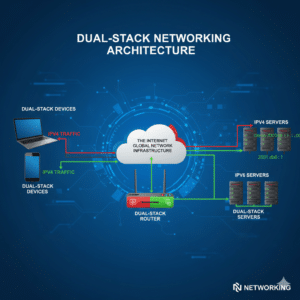
Dual Stack
Supports both protocols simultaneously.
Dual Stack remains the most common approach.
How to Check Whether You’re Using IPv4 or IPv6
Most users don’t know which protocol they are currently using.
Fortunately, checking is easy.
Windows Method
Open:
Command Prompt
Type:
ipconfig
Press Enter.
Look for:
IPv4 Address
and
IPv6 Address
Example:
IPv4:
192.168.1.10

IPv6:
2001:db8::10
Linux Method
Open Terminal.
Run:
ip addr
or
hostname -I
The system displays assigned IPv4 and IPv6 addresses.
macOS Method
Open Terminal.
Run:
ifconfig
Look for:
inet
and
inet6
entries.
Check Using Websites
Many online tools display your public IP information.
These tools can show:
IPv4 Address
IPv6 Address
ISP Information
Location Information
You can later create a dedicated:
What Is My IP Tool
on RPacket.
Frequently Asked Questions
Which Is Better: IPv4 or IPv6?
IPv6 is technically superior because it provides:
More addresses
Better scalability
Improved routing
Reduced NAT dependence
However, IPv4 remains widely used because of compatibility requirements.
Is IPv6 Faster Than IPv4?
In some cases, IPv6 may provide slightly better performance.
However, the difference is usually small.
Factors such as:
ISP quality
Routing
Server location
have a greater impact on speed.
Will IPv4 Disappear Completely?
Not anytime soon.
IPv4 remains deeply embedded in internet infrastructure.
Both protocols will likely coexist for many years.
Why Was IPv6 Created?
IPv6 was created primarily to solve IPv4 address exhaustion.
It also improves scalability and modern networking capabilities.
Can IPv4 and IPv6 Communicate Directly?
Not usually.
Special transition technologies are often required.
Examples include:
Translation
Tunneling
Dual Stack
Is IPv6 More Secure Than IPv4?
IPv6 offers several security advantages.
However, security still depends on:
Configuration
Firewalls
Updates
Security practices
No protocol is automatically secure.
Why Do IPv6 Addresses Look So Long?
IPv6 uses:
128 Bits
compared to:
32 Bits
for IPv4.
The longer format allows dramatically more addresses.
Does IPv6 Eliminate NAT?
In most situations, yes.
IPv6 provides enough addresses for individual devices to have globally unique addresses.
Do I Need IPv6 at Home?
Most users can benefit from IPv6 support.
Many ISPs already provide IPv6 connectivity automatically.
Are Websites Using IPv6?
Yes.
Major websites support IPv6, including:
Google
Facebook
YouTube
Netflix
Amazon
IPv6 adoption continues growing each year.
Can I Disable IPv6?
Yes.
Most operating systems allow IPv6 to be disabled.
However, this is generally not recommended unless troubleshooting specific issues.
Is IPv6 Mandatory?
No.
Many networks still operate using IPv4.
However, IPv6 adoption is increasingly encouraged.
Does IPv6 Improve Gaming?
In some cases.
Benefits may include:
Better peer-to-peer connectivity
Reduced NAT issues
Improved routing
Results vary depending on the game and network.
Is IPv6 the Future of the Internet?
Yes.
Networking experts widely consider IPv6 the long-term future of internet addressing.
Conclusion
The comparison between IPv4 and IPv6 represents much more than a simple technical upgrade.
It reflects the evolution of the internet itself.
IPv4 successfully powered the internet for more than four decades and remains an essential part of modern networking. Its simplicity, widespread adoption, and mature infrastructure continue to make it valuable.
However, the explosive growth of connected devices exposed limitations that IPv4 was never designed to handle.
IPv6 was developed to address these challenges by providing:
Virtually unlimited addresses
Better scalability
Improved routing efficiency
Reduced dependence on NAT
Support for future internet growth
Today, both protocols operate together across much of the internet through Dual Stack deployments.
As businesses, cloud providers, ISPs, and technology companies continue adopting IPv6, its role will become increasingly important.
For networking professionals, cybersecurity experts, cloud engineers, and IT students, understanding both IPv4 and IPv6 is essential.
While IPv4 remains important today, IPv6 is the protocol that will help power the next generation of internet innovation.
Key Takeaways
✓ IPv4 uses 32-bit addresses.
✓ IPv6 uses 128-bit addresses.
✓ IPv4 supports approximately 4.3 billion addresses.
✓ IPv6 supports approximately 340 undecillion addresses.
✓ IPv6 reduces dependence on NAT.
✓ IPv6 offers better scalability.
✓ Dual Stack allows IPv4 and IPv6 to coexist.
✓ Major technology companies actively support IPv6.
✓ IPv6 is considered the future of internet addressing.
✓ Understanding both protocols is essential for networking and cybersecurity professionals.